Get your evenings back.

Send a link. It answers from your price list, handbook or course notes, in the voice you set.

See pricing We’ll email you a sign-in link. No password.
Riku the bunny, waving
Visitor
Is the studio package billed monthly or once?
Fernlea Studio assistant
Once. The studio package is a single fee, and the care plan on top is monthly if you want it.
From: Price list 2026.pdf
What it’s for

Time back. Or more sales.

The inbox that stops. The follow-up timed to interest.

Riku the bunny, in a hoodie
Time back

The new hire stops interrupting you

An onboarding guide for new hires. Give it the handbook and the holiday policy. Share it with your team only, so it never leaves the building.

Who signs off my expenses?
Your line manager, through the finance form. Anything over the limit in section 4 also goes to Priya.
Riku the bunny, ears up
Time back

Help at 11pm, without you

A course tutor. It works from your slides and reading list. Students enter an email to start, so you see who used it.

What’s the difference between week 3 and week 4’s models?
Week 3 is the single-loop version from the lecture slides. Week 4 adds the feedback step. Want the reading for it?
Riku the bunny, holding a heart
More sales

The deal doesn’t go cold

A sales assistant that knows the price list. Load the price list and your notes on discounts. Put the link on your quote emails.

Do you do a discount for charities?
Yes, registered charities get the community rate. Send your charity number with the order and it’s applied.
Riku the bunny, standing
More sales

Call them while they’re still interested

An “ask my proposal” link for a client. Load the proposal and send a password link. See when they opened it and what they asked, before the call.

Can phase two start before phase one is signed off?
The proposal has them in sequence, but section 6 allows an overlap of a fortnight if both sides agree.
Templates

Start from a job that’s already written.

Fourteen templates in four groups. Pick one, paste in your own price list, policies or handbook, and it’s ready to share.

Support

Answer customers, so you stop typing the same reply.

Support desk

Answers the questions you get every day, so you stop typing the same reply.

Delivery and returns

Handles “where's my order?” and “how do I return this?” for you, day and night.

New customer guide

Gets new customers set up without a single “how do I start?” email.

Docs helper

Answers “how do I…?” from your docs, so your support queue is the hard questions only.

Sales

Answer buyers while they're interested, and know who asked.

Sales questions

Answers buyers while they're still interested, and gets you their email.

Product finder

Helps shoppers find the right product, like your best shop assistant would.

Ask my proposal

Lets a client ask about your proposal any time, and shows you what they asked before the call.

Property enquiries

Answers every “is it still available?” and “are pets OK?” so you only call the serious ones.

Front desk

The practical questions about visiting, staying or attending.

Opening hours and bookings

Answers “are you open?”, “where do I park?” and “how do I book?” so the phone stops ringing.

Event info desk

Answers the questions everyone asks about your event, so your team can run it.

Guest welcome guide

Answers your guests' Wi-Fi, check-in and house-rule questions, so your phone stays quiet.

Your people

Private helpers for your team, students and clients.

Staff handbook helper

Answers your team's policy questions, so they stop interrupting you.

Course helper

Answers your students at 11pm, so you don't have to.

Client portal helper

Answers your clients' “where are we up to?” and “how do I…?”, so you can get on with the work.

Your context

It says what you’d say. Nothing you wouldn’t.

Paste text, add documents, or point it at pages on your site. That’s what it knows, not the whole internet.

You set the persona and the instructions. Tone, what to say when it doesn’t know, what never to promise.

The house model is included. To use your own OpenAI, Anthropic, Google or OpenRouter key, add it once for the whole workspace.

  • OpenAI
  • Anthropic
  • Google
  • OpenRouter

Fernlea Studio assistant

PersonaFriendly, brief, never pushy. Speaks for Fernlea Studio.
InstructionsQuote prices only from the price list. If someone asks for a custom job, take their email and say Jo will reply within a day.
FilePrice list 2026.pdf4 pages
URLfernlea.studio/faqfetched
TextNotes on discountspasted
Model: House modelIncludedYour key

How it works

It answers. You know who asked.

1

It answers the way you would

A chat that sounds like you, from your documents and links. You see it in the preview first.

2

Only the people you mean

Your team, or a link: public, password, or an email first.

3

Know who asked, and when to follow up

Who opened it, how many sessions, and what they asked first. Per app and per link.

Sharing

The right people, and only them.

One app can have as many links as you like. Revoke any of them, or set an expiry date.

They opened it three times. Call them.
riku.app/hartwell-proposal Password Last opened 2 hours ago
9Opens
3Unique viewers
5Sessions
41Messages
What they asked first
  1. Can phase two start before phase one is signed off?
  2. What happens if we need to pause the project?
  3. Who on your side runs the workshops?
Riku the bunny, wearing a support headset
The Inbox

It answers while you’re busy. You step in when it matters.

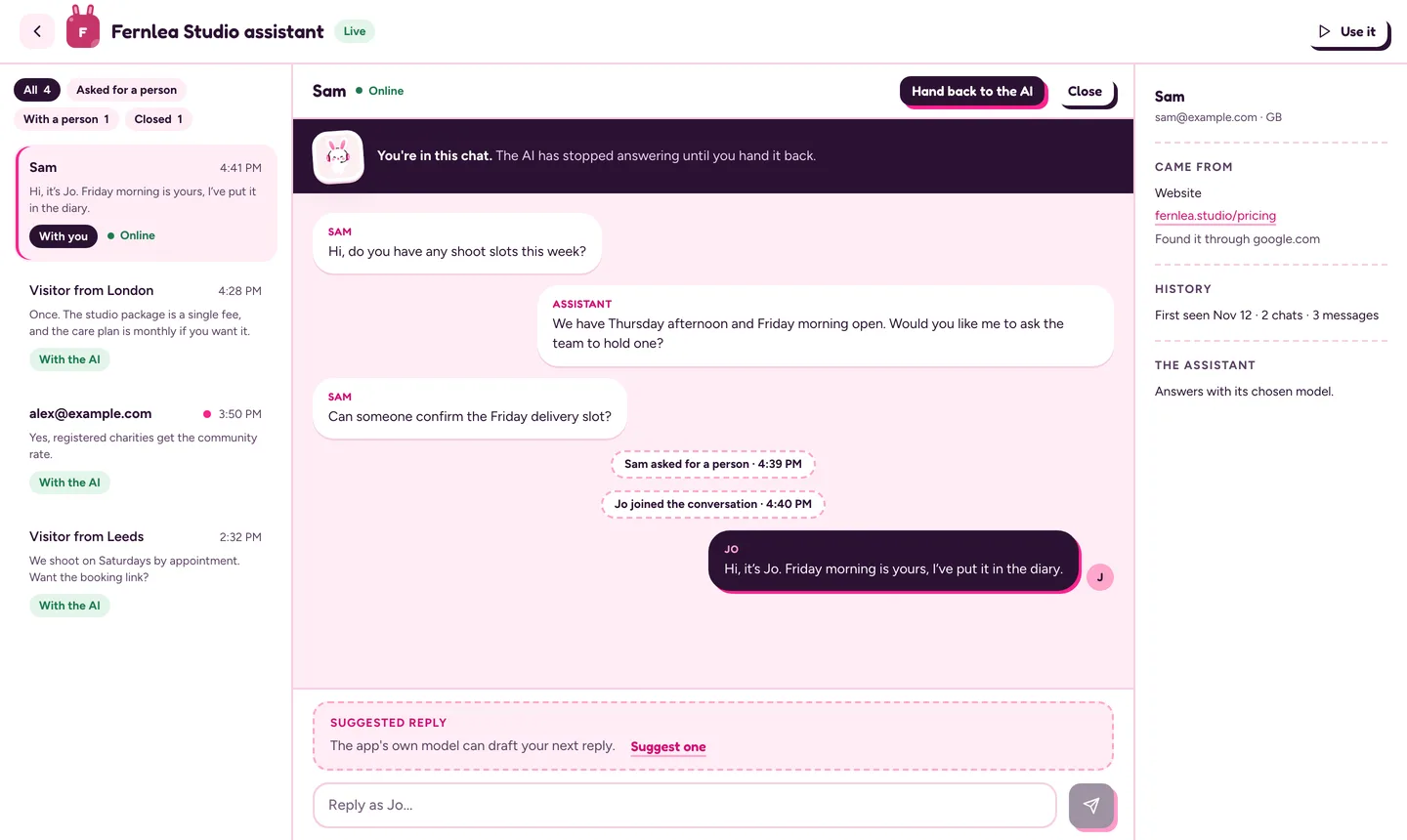
Every chat lands in one Inbox. When a visitor presses “Talk to a person”, your team gets an email. Step in, reply as yourself with your photo beside your words, then hand it back to the AI. The visitor sees who joined.

Riku’s Inbox: a list of chats on the left, and a conversation where Jo has stepped in to confirm a Friday slot
On your website

Buyers get an answer while they’re still looking.

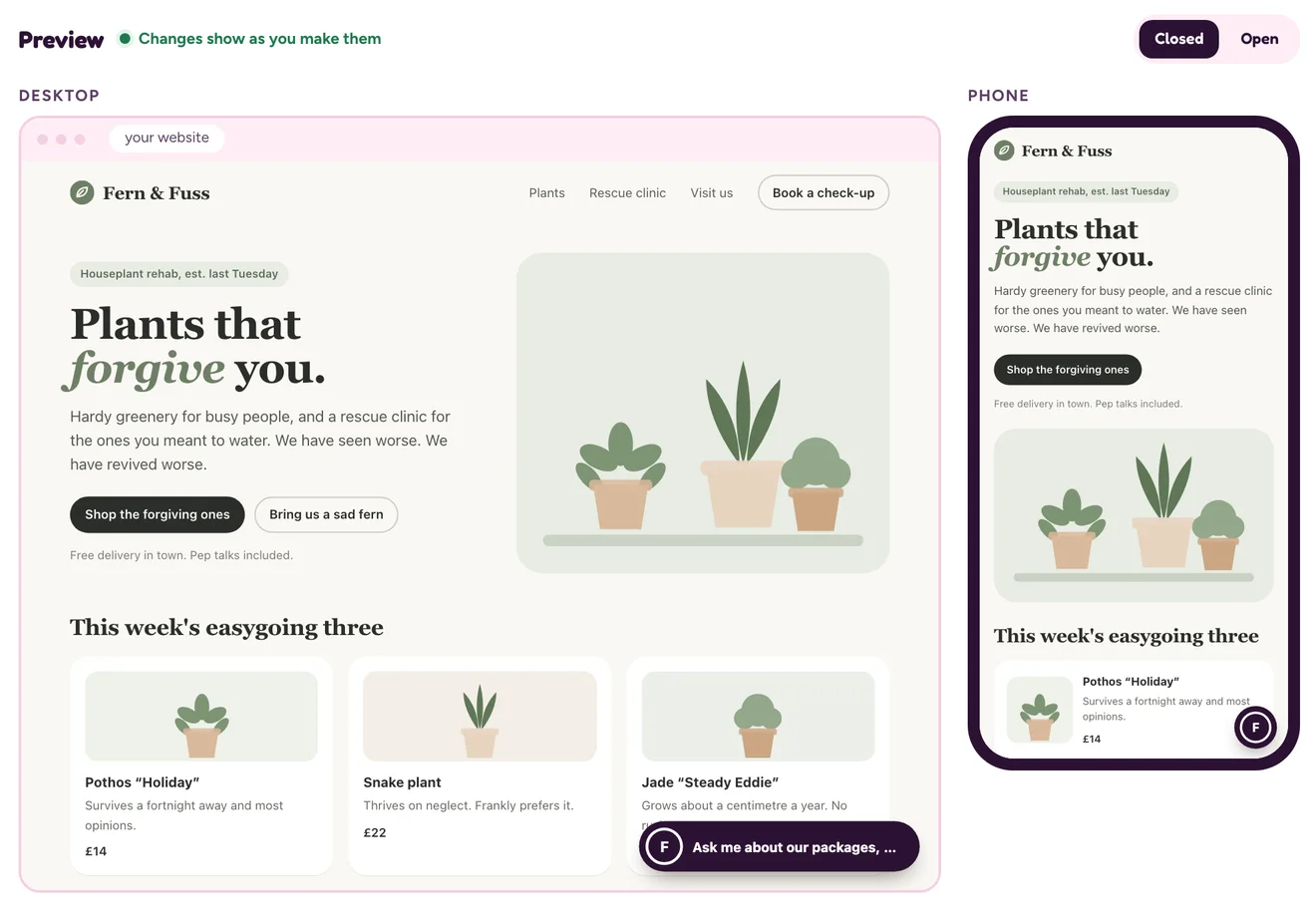
The same app sits on your site as a chat widget. Choose a bubble, a pill or a peek from the corner, in your colours, with your logo. The preview changes as you do, on a desktop and a phone.

It’s one line of code. See the steps for your platform.

Riku’s widget preview: a pill launcher in the corner of a sample website, on a desktop and a phone
Fits how you work

Leads reach your tools. Your AI tool does the clicking.

New leads go straight to your own system

A webhook tells your CRM, sheet or automation tool when a chat starts, a visitor gives their email, someone asks for a person, a chat closes, or a word you’re watching comes up.

Ask Claude or Cursor to do it for you

Connect your AI tool and ask it to build an app, publish it, make a link, or tell you what people asked this week. How to connect

Plans

Pick a plan. Have it answering today.

Pro Builder

$29/month$290per year

Saves $58 a year compared with paying monthly.

For one person whose apps are part of the job.

  • Unlimited apps
  • 500 included messages a month
  • Email-first links, and the Inbox to step into chats
  • 90 days of analytics
  • Connect your AI tool
Get Pro Builder

Advanced Builder

$49/month$490per year

Saves $98 a year compared with paying monthly.

For a team that builds, shares and watches apps together.

  • Everything in Pro Builder
  • 5 people in the workspace
  • 3,000 included messages a month
  • 13 months of analytics
  • Riku badge hidden on your links and widget
Get Advanced Builder

Prices are in US dollars, billed monthlybilled yearly, in advance, plus any sales tax or VAT that applies. Cancel from Billing in Riku; your plan runs to the end of the period you’ve paid for.

Get this evening back.

Bring one document. You’ll have a link to send.

Get started
Riku the bunny, asleep